.png)
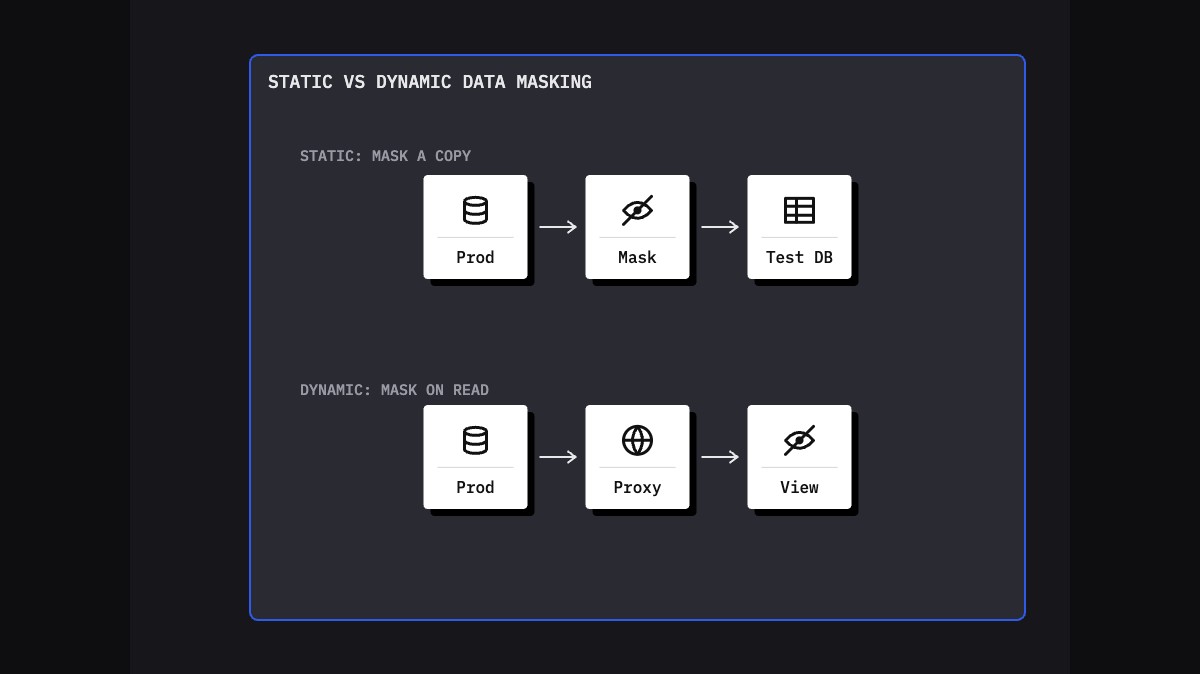
Dynamic data masking hides sensitive values in query results at read time, depending on who is asking, while the stored data stays unchanged. Static data masking permanently replaces sensitive values in a copy of the data, so the masked database contains no real personal data in the masked fields. Dynamic masking is an access control for production; static masking is how you make safe copies for development, testing and analytics.
How dynamic data masking works
Dynamic data masking applies masking rules in the database engine, or in a proxy between the application and the database. When a user without the right privilege runs a query, masked columns come back obscured, for example XXXX-XXXX-XXXX-1234 or j***@example.com. Privileged users see the real values. Nothing on disk changes, so existing applications keep working without modification.
Dynamic masking is useful where people need to work with production records but should not see every field:
- support and contact center staff who need the last four digits of a card, not the full number;
- reporting users who need rows and counts but not contact details;
- reducing accidental exposure in screenshots, exports and screen shares.
The limits of dynamic masking
Because the real data is still there, dynamic masking is a presentation control, not a privacy transformation. Database vendors' own documentation says it is meant to prevent accidental exposure, not to stop users with query access from inferring the underlying values. A user who sees a masked salary as 0 can still run WHERE salary BETWEEN 99999 AND 100001 and learn which employees earn about 100,000. Other limitations:
- Administrators and anyone granted an unmask privilege see clear data.
- Anyone with access to the underlying data files or backups sees clear data.
- Copies taken by privileged users or processes, such as exports and backups, contain unmasked values.
- Rules are defined per database, so consistency across systems is not built in.
How static data masking works
Static data masking reads data from a source, usually a production copy or backup, transforms the sensitive values and writes the result to a separate target database or file. Developers, testers and partners only ever see the masked copy. There is no unmask privilege, because the original values are not there.
A typical static masking run has five steps:
- Discover sensitive columns, including custom tables, free-text fields and attachments.
- Assign a rule to each: realistic substitution, format-preserving replacement, shuffling, generalization, nulling, or keep as is.
- Transform while reading from the source and write to a separate target, never back over production.
- Validate row counts, key relationships and the absence of residual real values.
- Provision the masked copy to the environments, test tools and pipelines that need it.
Good static masking is deterministic: the same input always produces the same output. A customer name or ID masked in one table then matches its masked value everywhere else, and a rerun next month produces the same result.
Dynamic vs static data masking at a glance
- Where it applies: dynamic masking works in production, at query time. Static masking works on non-production copies, before anyone uses them.
- Stored data: dynamic leaves it unchanged. Static replaces it.
- Reversibility: dynamic is fully reversible for privileged users. Static is designed to be irreversible.
- Inference: dynamic is weak against users with query access. Static removes the real values from masked columns, so filtering on them reveals nothing real.
- Performance: dynamic adds work to every query. Static costs processing time once per refresh.
- Typical users: dynamic suits operations and support staff. Static suits developers, QA, UAT, offshore teams, vendors and AI agents under test.
Why test environments need static data masking
Test environments have broader access, fewer controls and more copies than production. They are also where data leaves the organization: offshore teams, system integrators, automation tools and increasingly AI agents. Dynamic masking does not fit there, for three reasons:
- Testers need to query freely. Test automation and debugging run arbitrary SQL, which is exactly how dynamic masking is bypassed.
- Copies multiply. Test data is exported to files, loaded into other systems and attached to defect tickets. Masking that exists only at query time does not travel with the data.
- Regulators expect the stored data to be protected. PCI DSS v4.0.1 Requirement 6.5.5 keeps live card numbers out of pre-production environments unless those environments are protected as part of the cardholder data environment (see PCI DSS test data). For EU financial entities, Delegated Regulation (EU) 2024/1774, Article 16(5), requires non-production environments to store only anonymized, pseudonymized or randomized production data.
Dynamic masking can still add a second layer in non-production, for example in a shared UAT system, but the stored values in test should already be masked.
Consistency across databases and files
Enterprise test cases rarely live in one database. An order created in a CRM flows into the ERP, billing, a data warehouse and a PDF invoice. If each system is masked separately, the same customer ends up with a different name and ID in each, and end-to-end tests fail for reasons that have nothing to do with the code. Why referential integrity matters in test data management explains the cost of getting this wrong.
Static masking for integrated testing needs:
- Deterministic replacement, so one real customer becomes the same substitute in every system and every refresh.
- Referential integrity across declared foreign keys and across relationships enforced only in application code.
- Format preservation, so check digits and validation rules still pass.
- Coverage of files and free text, such as PDFs stored in BLOB columns, XML in integration logs and notes fields, which otherwise leak the original values next to masked tables.
Questions to ask before choosing
Most teams end up using both techniques, for different jobs. For any given data flow, these questions settle which one applies:
- Who will access the data, and can they run their own queries?
- Will the data be copied, exported or sent to another system or organization?
- Does anyone in this flow need to see real values, such as a support agent verifying a caller, or does nobody?
- Do tests span several databases, applications or files that must agree with each other?
- What do the rules that apply to you say about personal data outside production?
If the answers point to free querying, copies leaving the system, or nobody needing real values, use static masking. If a known group of production users needs partial visibility of live records, dynamic masking fits.
How Synthesized helps
Synthesized performs static masking for test and development copies. Data masking writes masked data to a target environment and gives each original value one replacement, applied in every table and connected system, so cross-system processes such as order-to-cash keep working in test. SAP data masking changes the stored values in ECC, S/4HANA and SAP HANA copies, including custom Z-tables, rather than hiding them at query time. The same policy extends to PDFs, notes columns and XML in integration logs through document masking for dev and test, so files that sit next to masked tables do not leak real values.
FAQ
What is dynamic data masking?
Dynamic data masking hides sensitive values in query results at runtime, based on the user's role or privileges. The data stored in the database is not changed, and privileged users still see real values. It is designed to reduce accidental exposure in production, for example for support staff, rather than to create data that is safe to copy or share.
What is static data masking?
Static data masking permanently replaces sensitive values in a copy of a database or file before anyone uses it. The masked copy contains realistic substitute values instead of real personal data, and there is no unmask privilege because the originals are gone. It is the standard approach for development, testing, training and analytics environments.
Can dynamic data masking be bypassed?
Yes, by users with query access. Because the real values remain in the database, a user can filter or join on a masked column to infer its contents, and administrators or anyone with access to data files and backups see clear data. Vendor documentation describes dynamic masking as protection against accidental exposure, not against deliberate inference.
Should I use dynamic or static masking for test environments?
Use static masking. Test environments need free querying, exports and integration with other systems, all of which bypass or outlive query-time masking. Static masking removes real values from the stored data, keeps formats and relationships intact when applied consistently, and supports requirements such as PCI DSS 6.5.5. Dynamic masking can be added as a second layer.